Guide
Your patient already
keeps the record.
Provider is the half that lets them hand it to you intact — protocols, dose history, bloodwork and check-ins — and lets you write back: a protocol change, lab results and visit notes that land in their own record, each one reviewed and applied by them. Patient records stay on your device.
What it is
Your patient already keeps the record — every dose, every lab panel, every weekly check-in. Provider is the half that lets them hand it to you intact, and lets you write back.
They export a file from their own app. You open it. It lands on your roster with their protocols, their dose history, their bloodwork and their symptom scores, and it stays there so the next visit starts from what you read last time rather than from memory.
Reading the record
Every figure is a chart
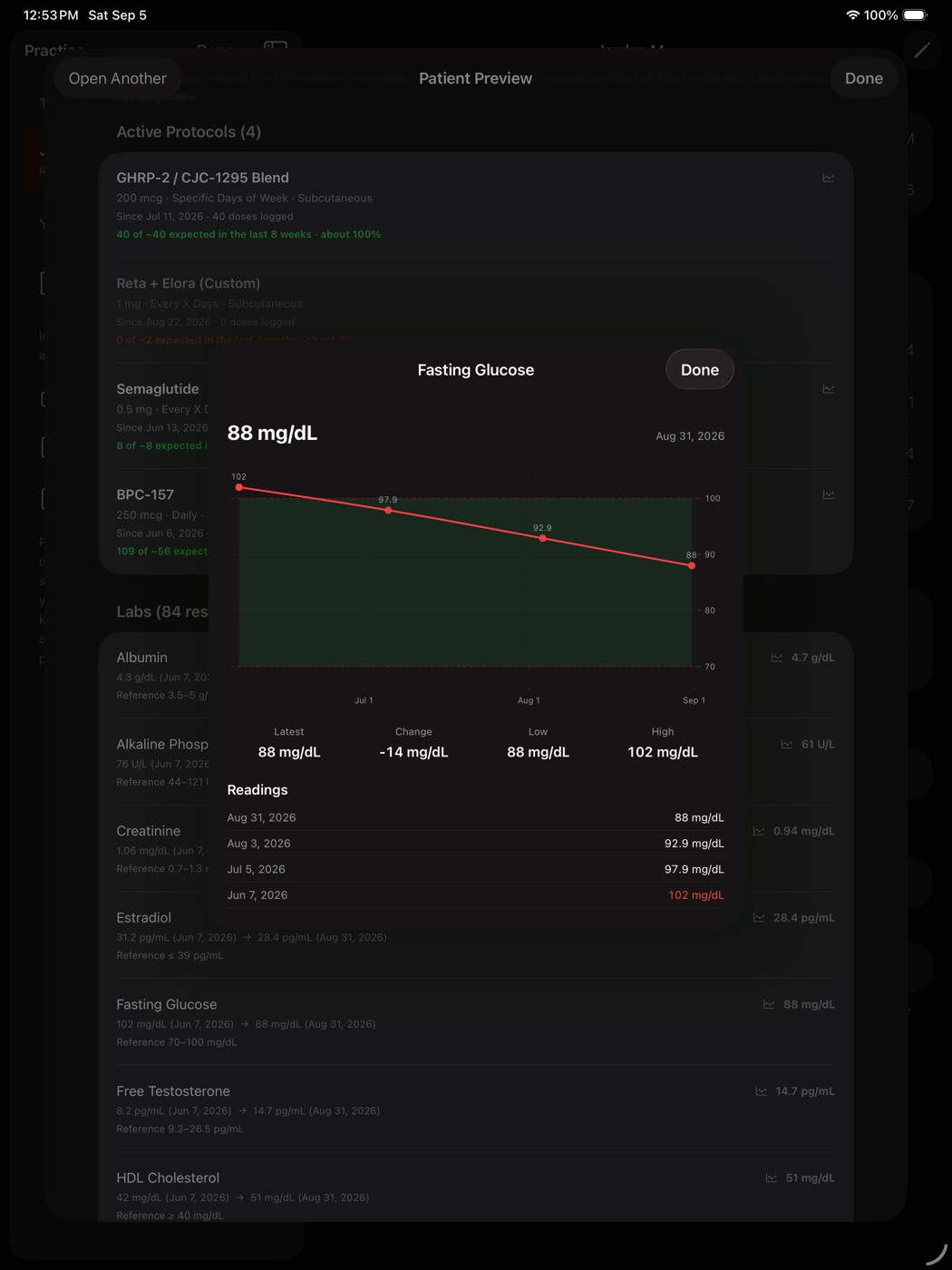
Lab markers, body metrics, symptom scores and each compound’s dose history open as a chart you can drag across to read any single day. Reference ranges are drawn in, and a value outside them is marked. Nothing is interpolated — scrubbing snaps to a reading the patient actually recorded, because an invented number between two lab draws is not a number anyone should read off a clinical screen.
Symptoms against dose days
The question a GLP-1 or TRT visit actually turns on is whether the side effect tracked the dose. Plot any symptom score or tracked metric against the days that patient dosed, with reported side effects marked along the axis. There is no correlation coefficient: with a handful of self-reported readings an r-value would look like evidence and would not be. You read the shape and draw your own conclusion.
What changed since last time
When they send a newer record, the previous one is kept alongside it, so the chart opens with the delta — doses logged, labs added, check-ins, protocols — rather than making you remember what the numbers were in March.
Writing back
You can propose four things: start a protocol, change one, pause one, or stop one. Each carries the dose, frequency, route, a titration ramp if you laid one out, and the reason the patient will read.
These are proposals. Your patient opens the file in their own app, sees each item, and chooses what to apply — a start or a change opens their own protocol editor so they see the exact record before it saves; a pause or a stop asks them to confirm. Nothing is applied automatically. That is deliberate and it is not configurable: a file that silently rewrote somebody’s dosing would make this a tool that administers treatment rather than one that records it.
Receiving your instructions is free for the patient, on every plan including the free tier.
What it looks like
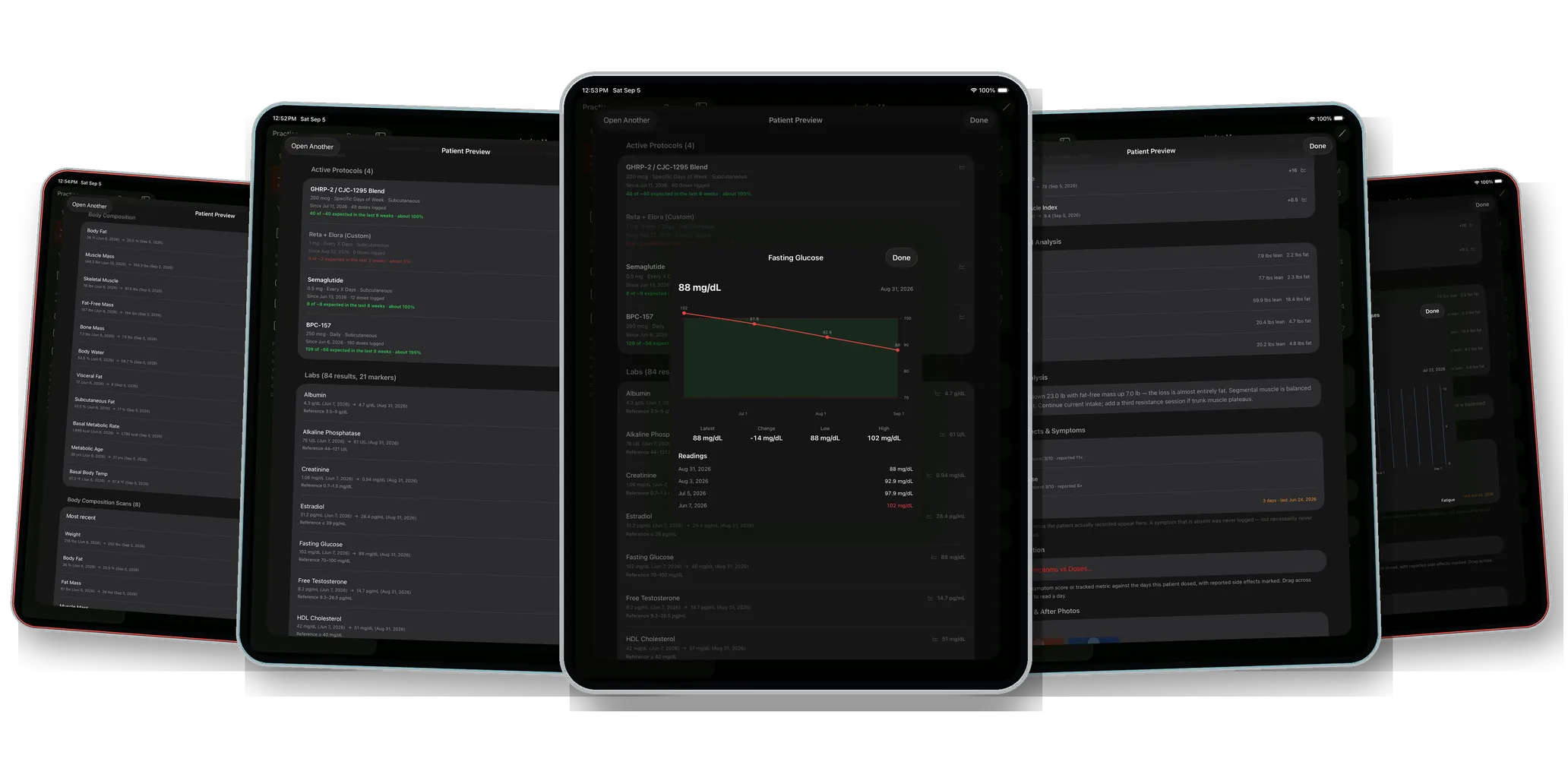
Sixteen screens from a real chart review on an iPad. Every one is the clinic’s own screen, captured from the app — nothing here is a mockup. The figures on them belong to this one patient (291 logged doses, 84 lab results across 21 markers, 8 body-composition scans, 27 check-ins), not to the app: there is no cap on protocols, markers, scans or history on any plan, and no limit on how many patients are on your roster.
The roster
Their whole record,
open on your iPad.
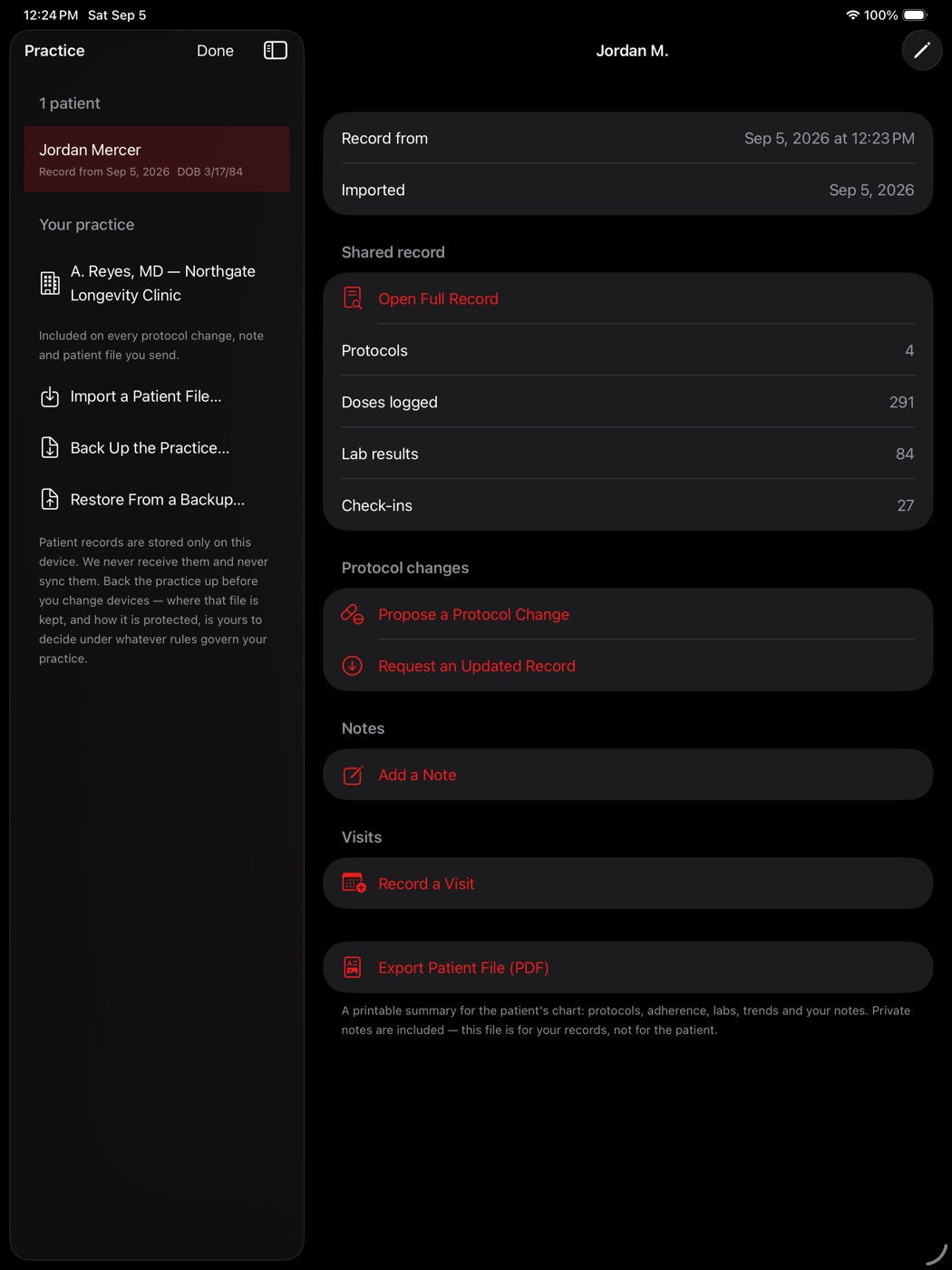
Patients on the left with search and your own chart or MRN reference. The record on the right. This one shared four protocols, 291 logged doses, 84 lab results and 27 check-ins — all of it readable, none of it retyped.
- No cap on how many patients you keep
- Search by name or your own reference
- Archive without deleting anything
The record itself
Everything they tracked,
since they started.
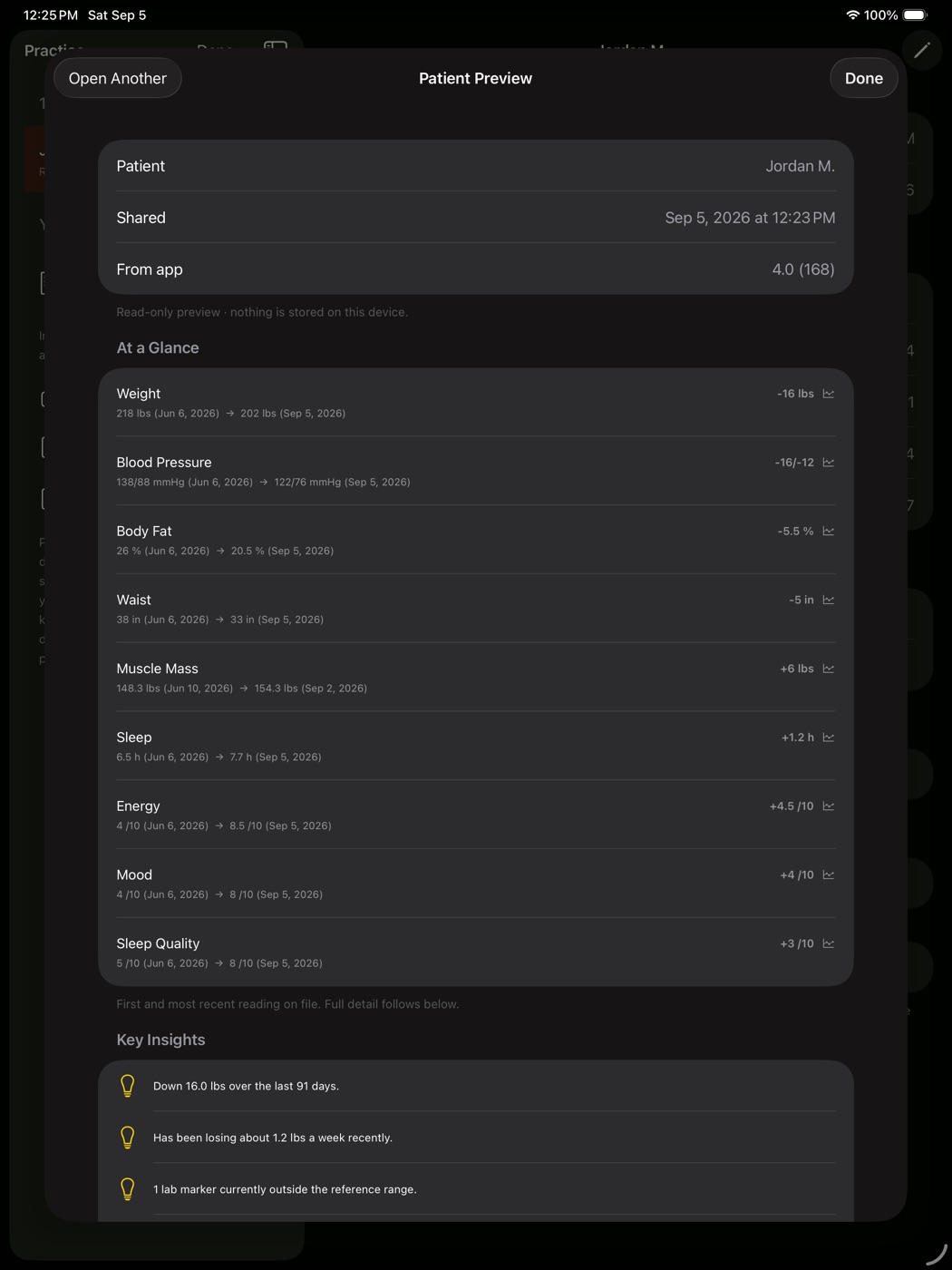
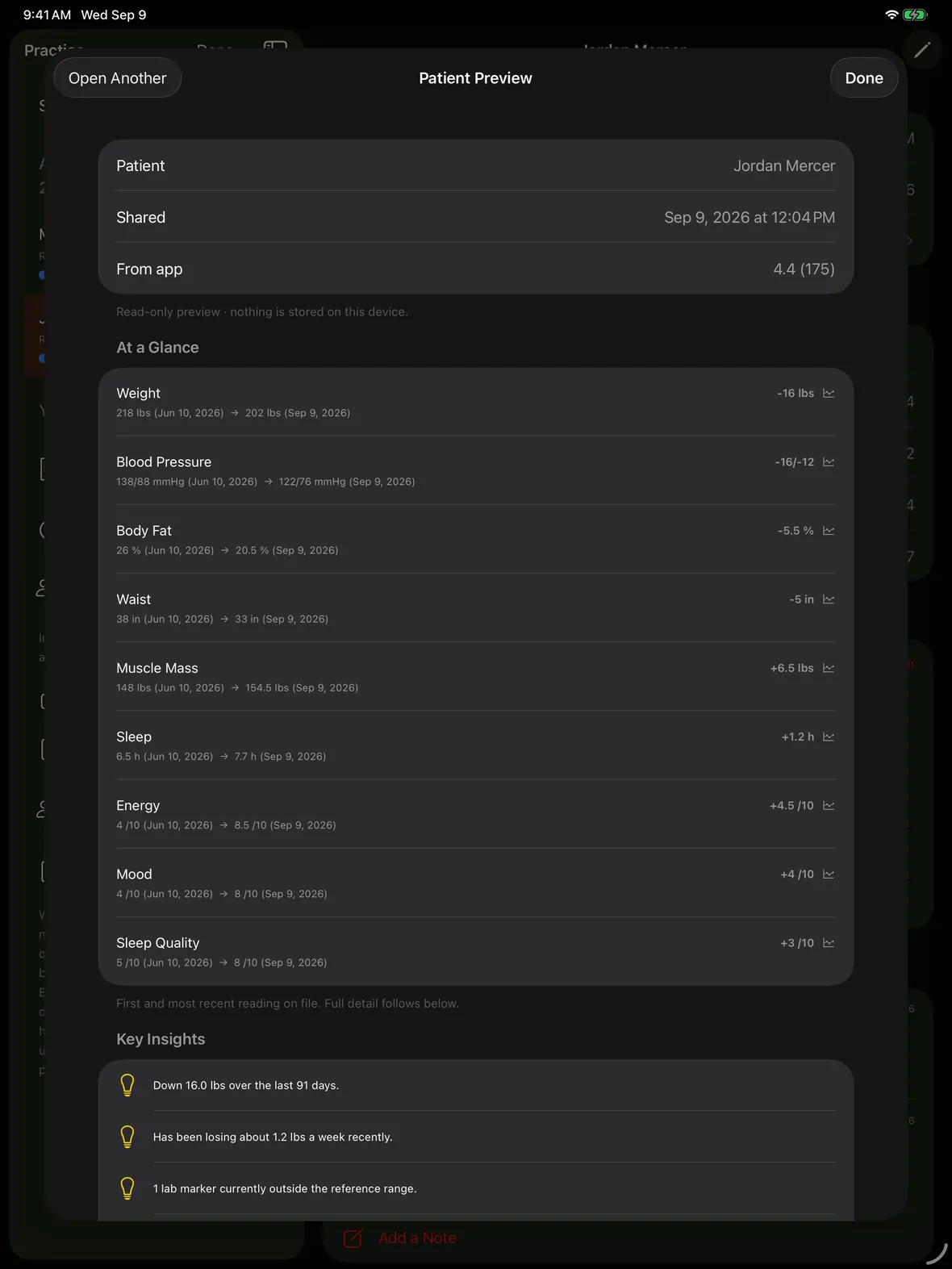
Weight, blood pressure, body fat and measurements as start-to-current deltas, then the detail underneath: protocols with adherence, every lab with its reference range, body composition, side effects, photos and their own notes.
- Down 16 lb, BP 138/88 → 122/76, body fat 26% → 20.5%
- Adherence per protocol, not just a dose count
- The same view whether they sent it today or a year ago
Every figure is a chart
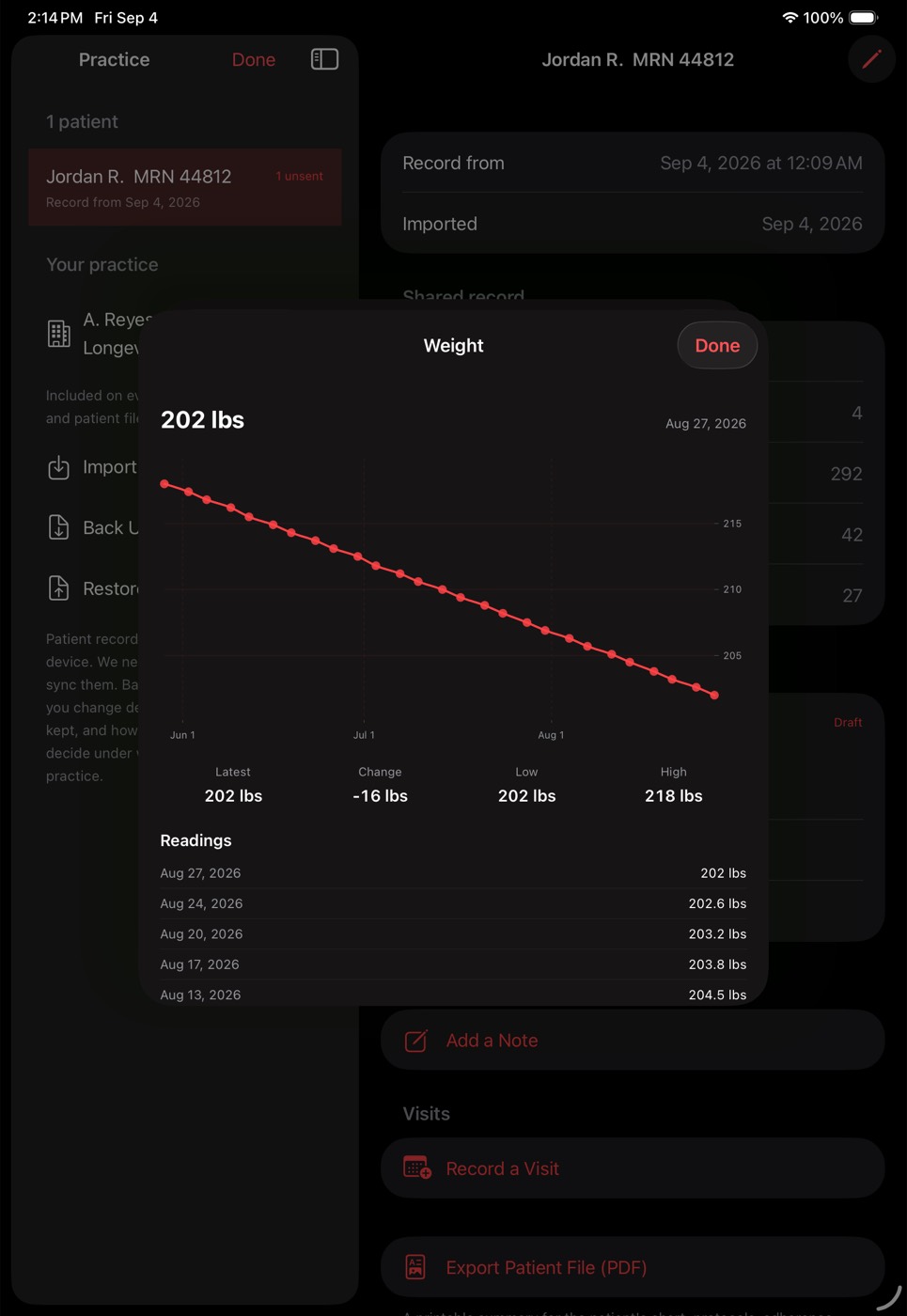
Tap any number.
Get the shape.
Twenty-seven weigh-ins with axes, dates, the high and the low, and every reading listed underneath. Drag across to read a single day — it snaps to a reading they actually recorded rather than inventing a value between two.
- Labs draw their reference band and flag what is outside it
- Body metrics, symptom scores and dose history all open the same way
- No bare sparklines — axes, dates and values, always
The bloodwork
Tap a marker.
Read its whole run.
Fasting glucose here, opened from inside the record: 102 down to 88 across four draws, the reference band shaded behind it, and the one out-of-range reading called out in the list underneath. Latest, change, low and high are computed for you.
- Ranges come from the lab that ran it, not from us
- Out-of-range values flagged on the chart and in the list
- Drag across the chart to read any single day
Panel at a glance
Every marker they have.
First value to latest.
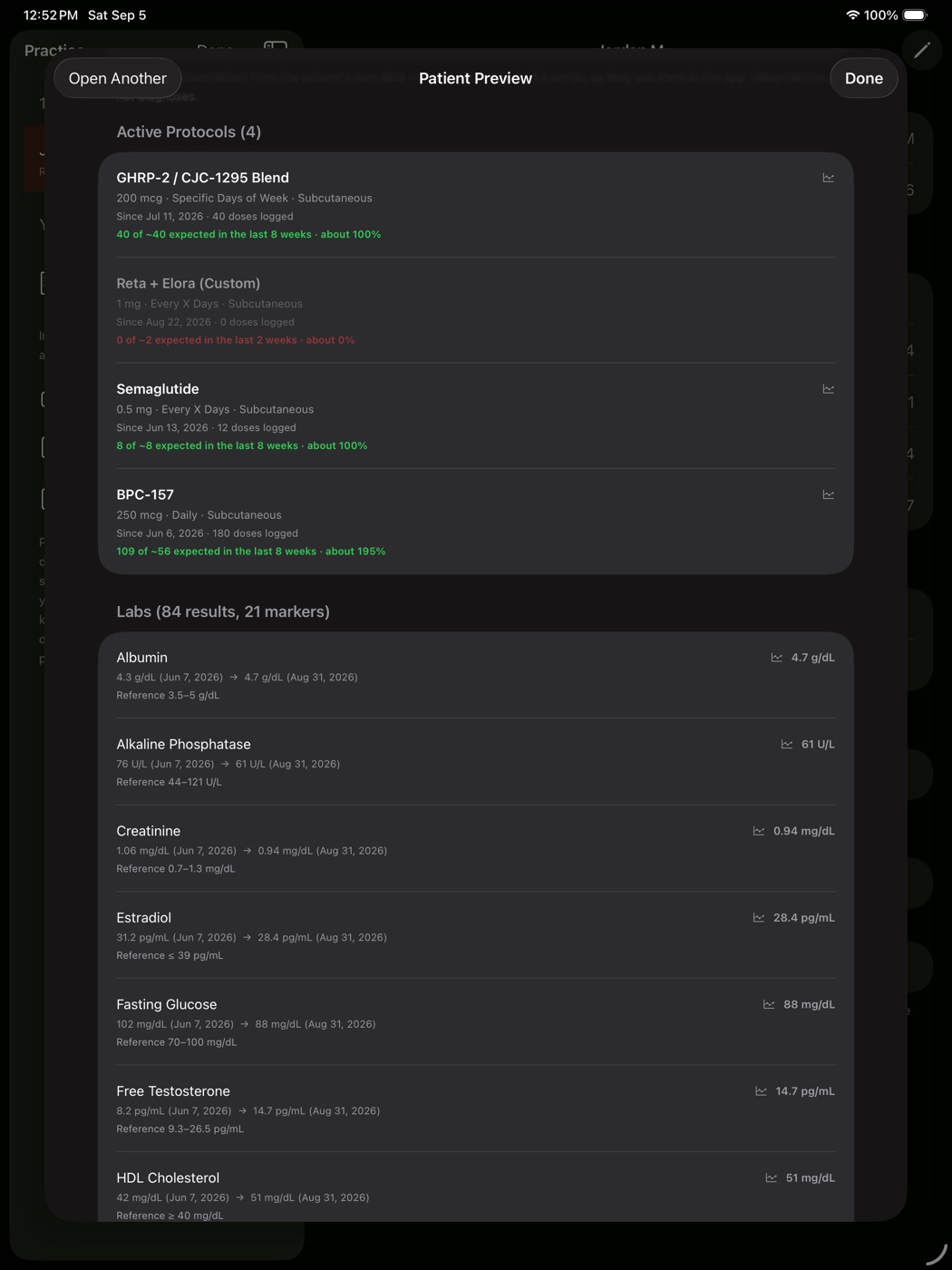
There is no marker list to fit into and no cap on how many you can read — the record carries whatever their lab reported. This patient happens to have 84 results across 21 markers, each showing where they started, where they are now and the range it is measured against. LDL sitting above its limit is red before you have read the number.
- Over 400 markers recognised by name, from a standard CMP to organic acids, heavy metals and specialty panels — and anything it does not recognise is still tracked and charted
- Imported straight from a lab portal PDF, or typed
- Out-of-range markers flag themselves in the list
- Your patient sees the same thing, so you are discussing one document
Body composition
Every scan.
Every metric, all charted.
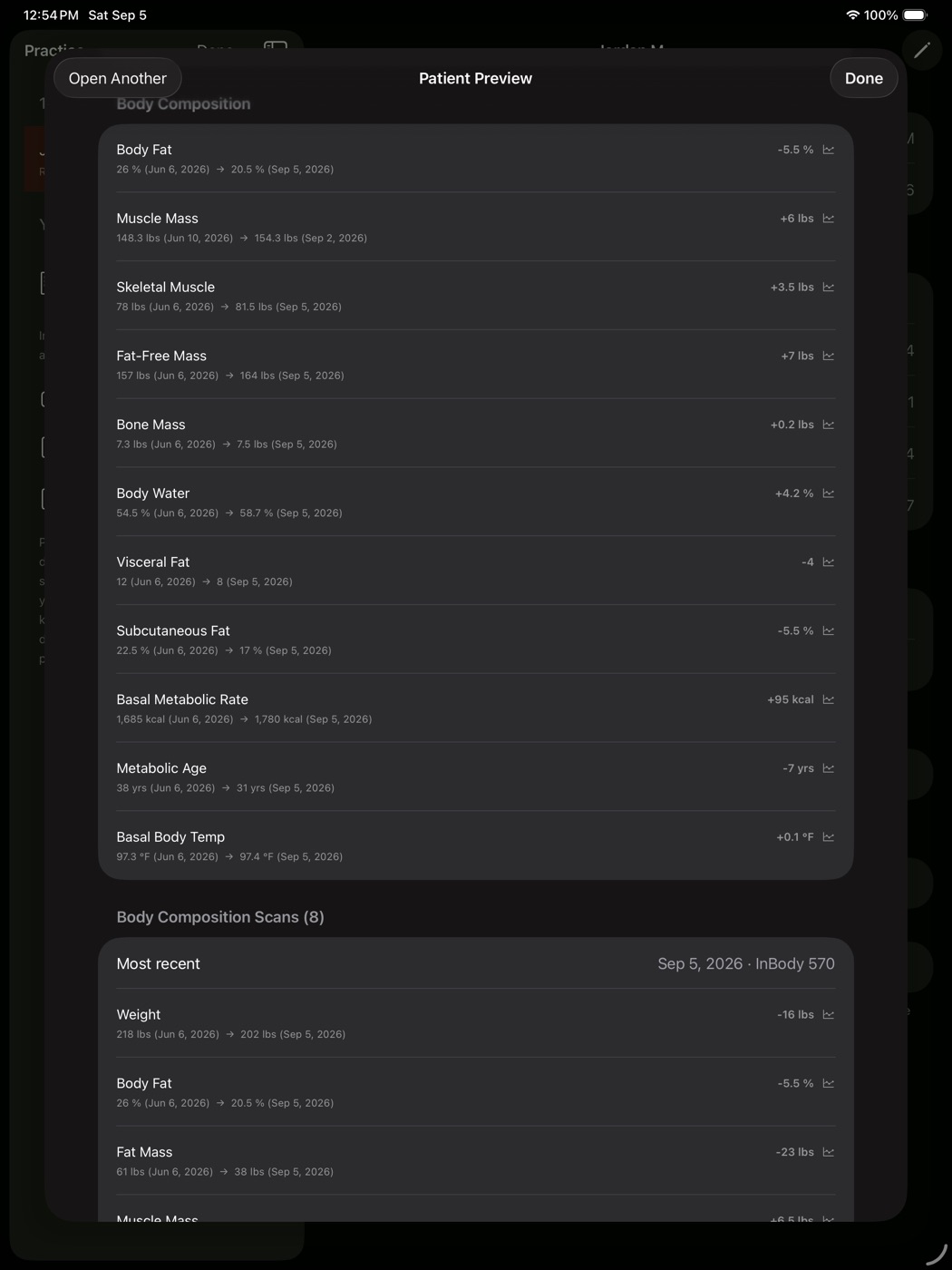
InBody and smart-scale imports arrive as their own records, and every metric on them is a series rather than a snapshot — up to 27 per scan, plus per-limb segmental muscle and fat: weight, fat mass, fat-free mass, body water, visceral fat, BMR, metabolic age, fitness score, skeletal muscle index and the rest. This patient has eight scans with fourteen metrics populated; the app charts whatever the scale reports.
- Each row opens its own chart, same as the labs
- Fat mass and fat-free mass tracked separately, so you can see which moved
- Nothing is re-typed — the patient imports the scan, you read it
The question behind the weight
Was it fat,
or was it muscle?
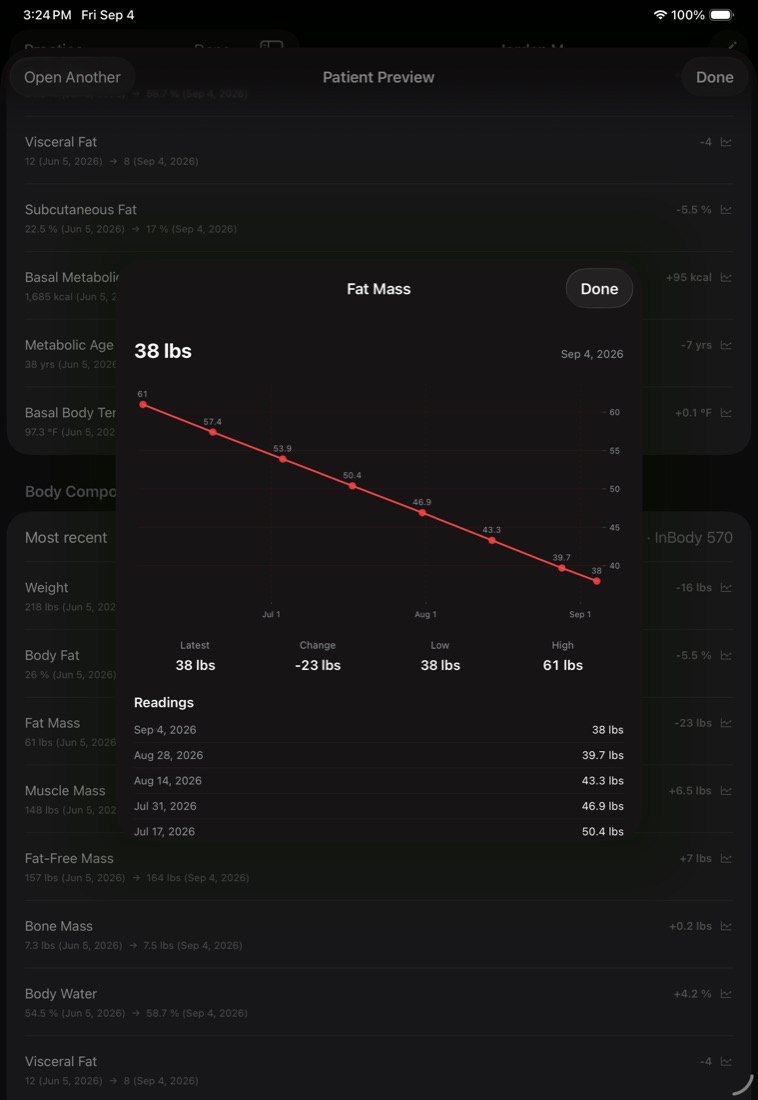
The number a scale can’t give you. In this record sixteen pounds came off the scale, but fat mass is down twenty-three and fat-free mass up seven — and the eight-point line shows it came off steadily rather than in a crash. Those are one patient’s figures, not a typical result; what the app gives you is the split.
- Every scan plotted, with the readings listed underneath
- Latest, change, low and high computed across the run
- Same chart for any metric on the scan
Segment by segment
Left to right,
site by site.
The part of a scan a bathroom scale cannot produce: lean and fat mass for each arm, the trunk and each leg, so left-right asymmetry is visible at a glance. The scan’s own written analysis rides along underneath it.
- Five sites, lean and fat mass on each
- Reported verbatim — we never re-classify a vendor’s grid
- Absent on scales that don’t measure it, rather than faked
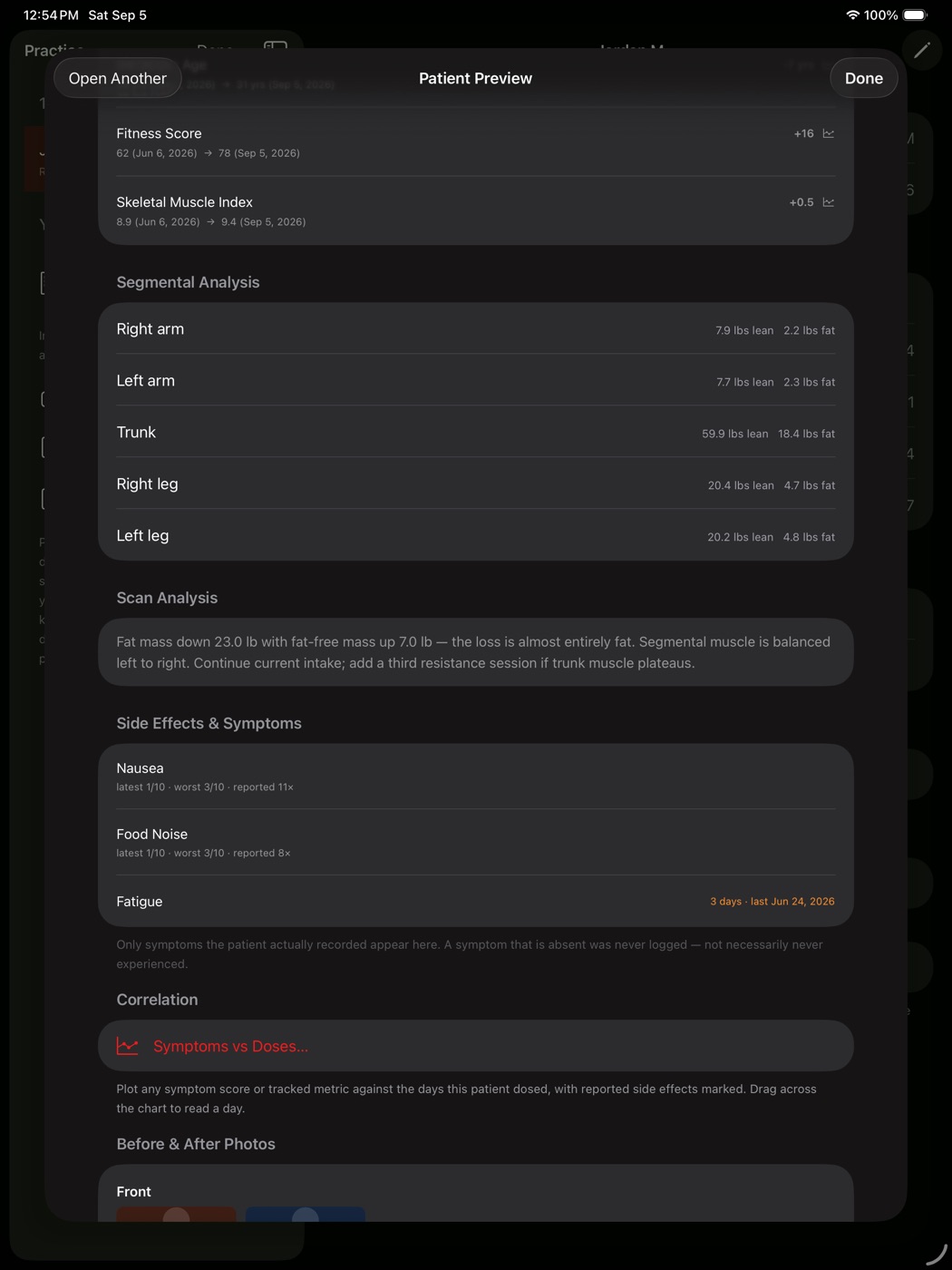
Cause and effect
Did the dose
cause the symptom?
Plot any symptom score against the days this patient actually dosed. Nausea against semaglutide here — every dose day drawn as a line, every reported side effect marked, so the timing question answers itself instead of being reconstructed from memory.
- Any tracked symptom against any compound in their protocol
- Drag across the chart to read a single day
- Only symptoms the patient actually logged — nothing inferred
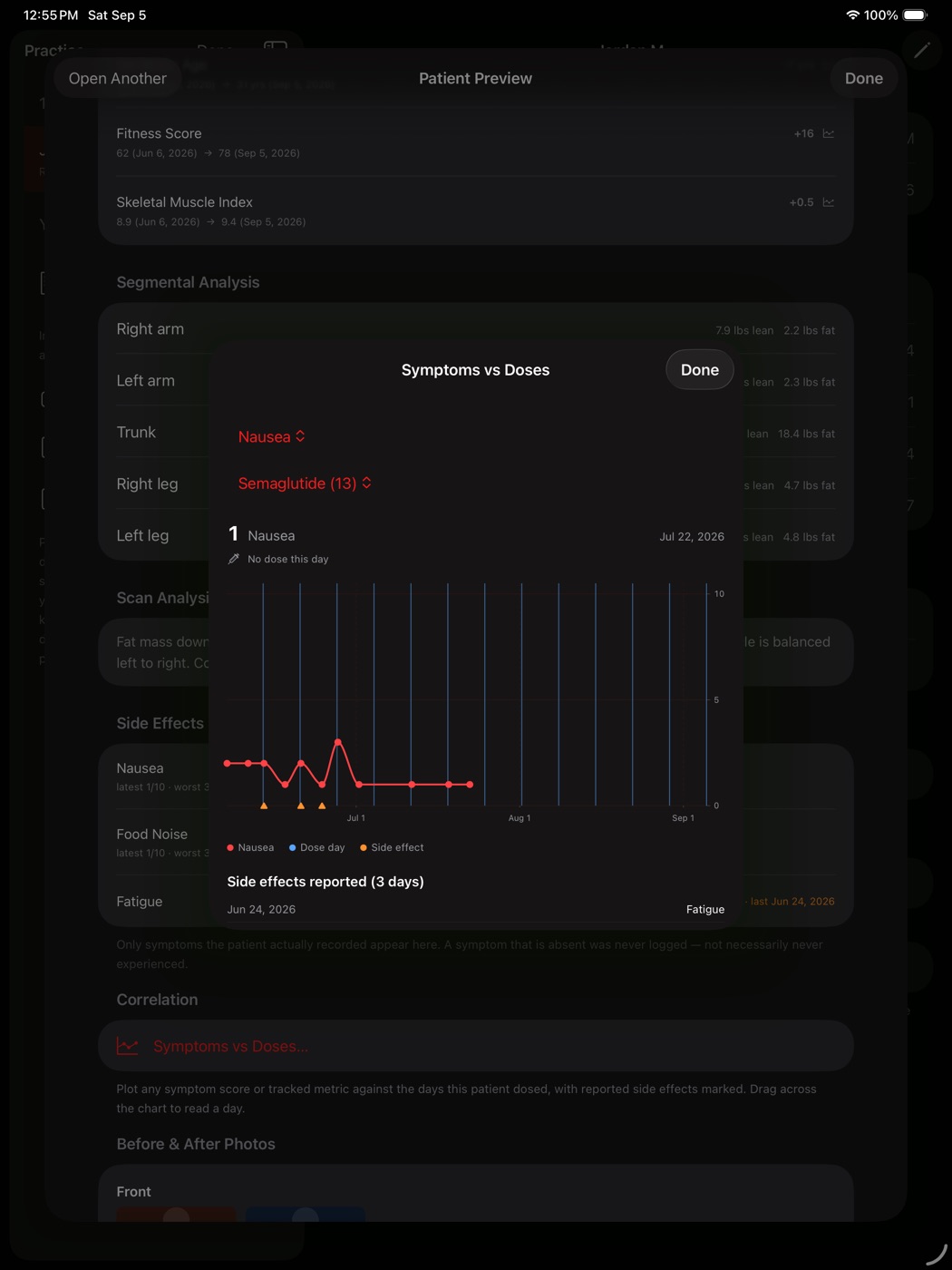
The long arc
Biological age,
with the protocols marked.
Estimated biological age against actual age, with a dashed vertical where each protocol started — so whether the gap widened after one began is something you look at rather than argue about. Ranked contributors underneath.
- Levine PhenoAge or Klemera-Doubal, whichever your panel supports — each labelled as the research tool it is
- Change attributed per protocol, by first and last draw
- Educational only — and the app says so on the screen
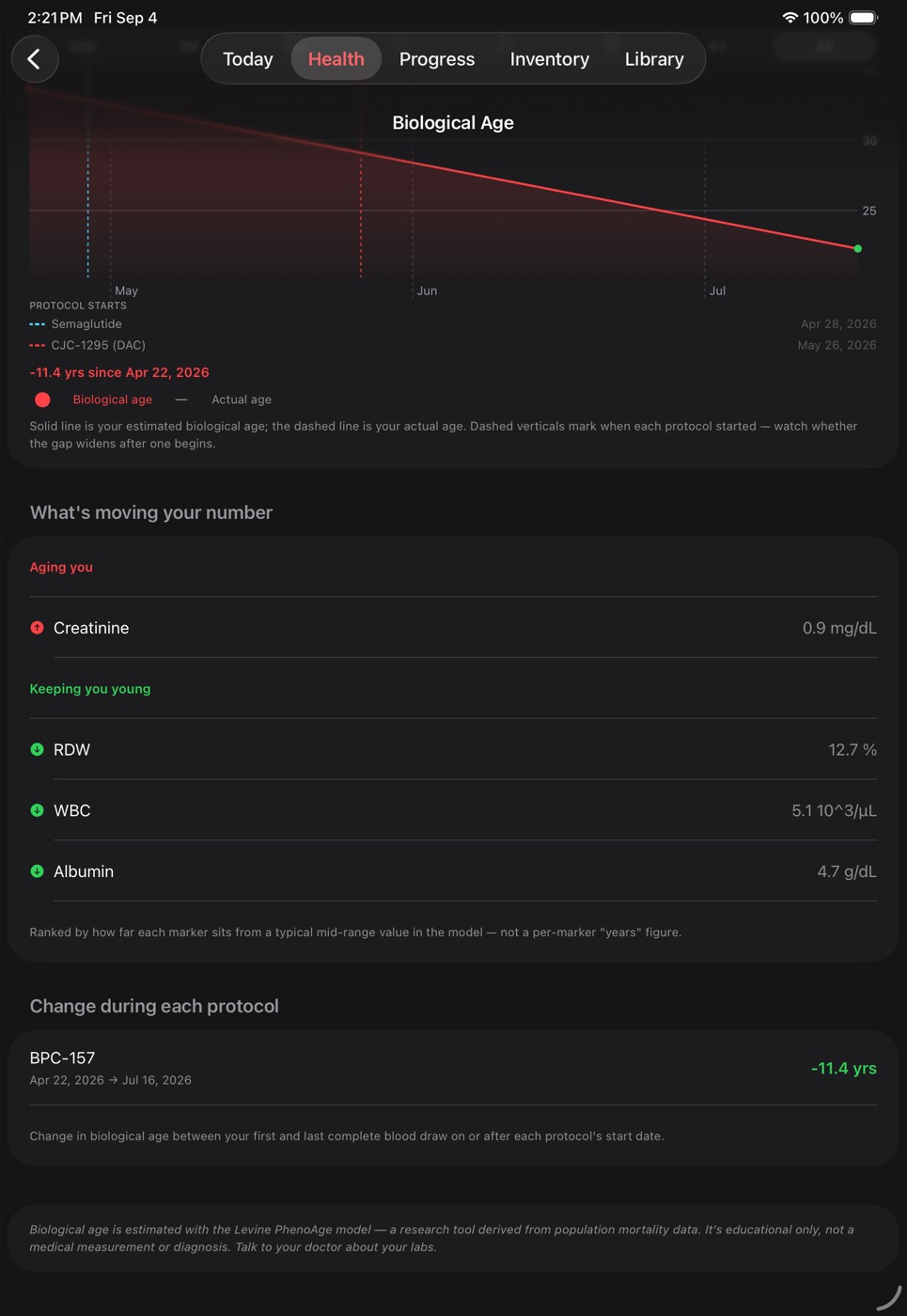
What they report
Energy, mood, sleep —
and what moved.
The subjective half, which is usually the half a patient actually describes at a visit. Energy 4→8.5, mood 4→8, sleep up 1.2 hours, all with dates and averages over the window.
- Every metric they track, including their own custom ones
- Averages over the period, not just the latest reading
- Plot any of it against the days they dosed
Your letterhead
Entered once.
On everything you send.
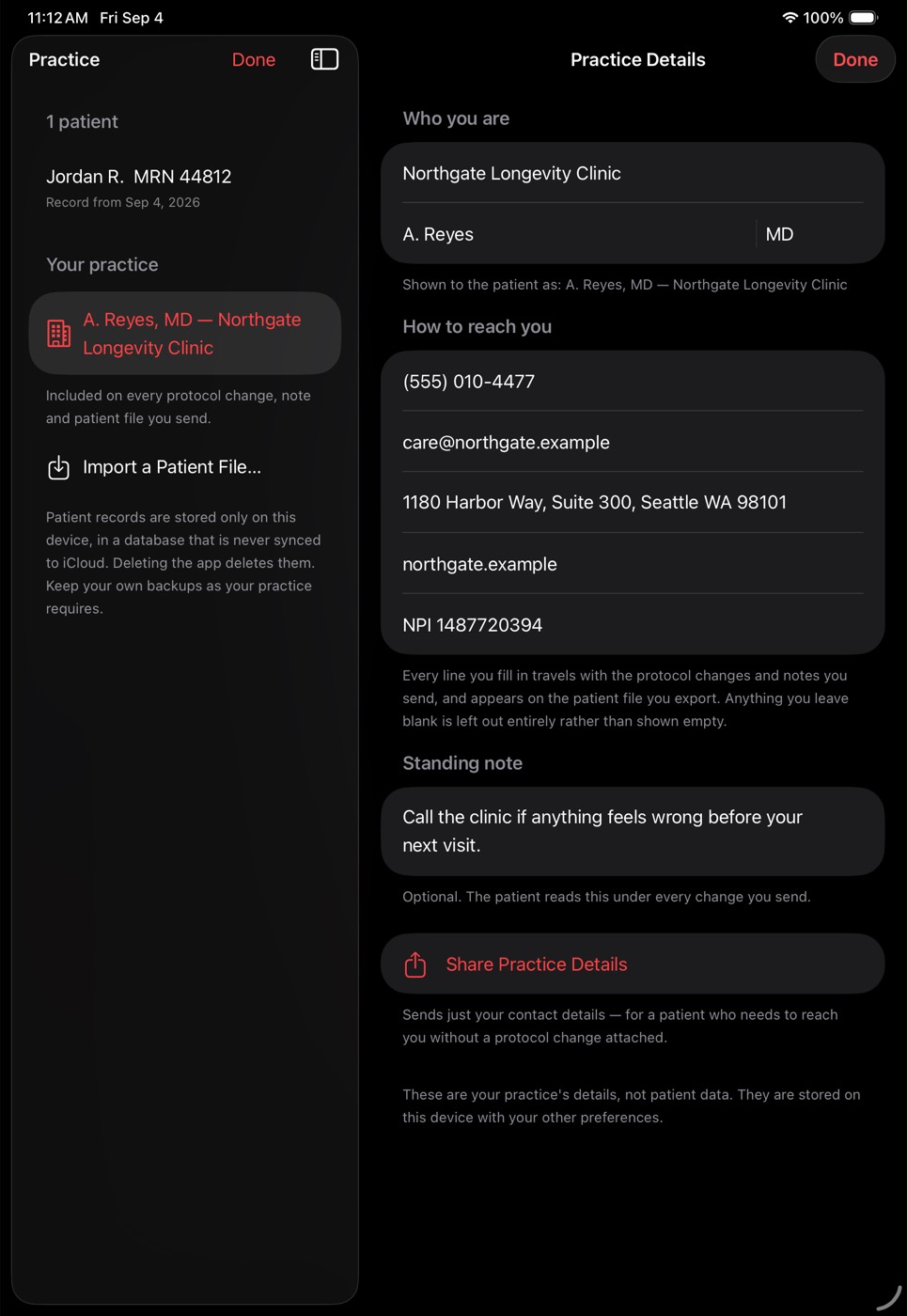
Practice, clinician, credentials, phone, email, address and NPI. It travels inside every protocol change, prints on the patient file you export, and can be shared on its own when someone just needs to reach you.
- Anything you leave blank is left out, not shown empty
- A standing note the patient reads under every change
- Restores onto a new device with your backup
Writing back
Start, change,
pause or stop.
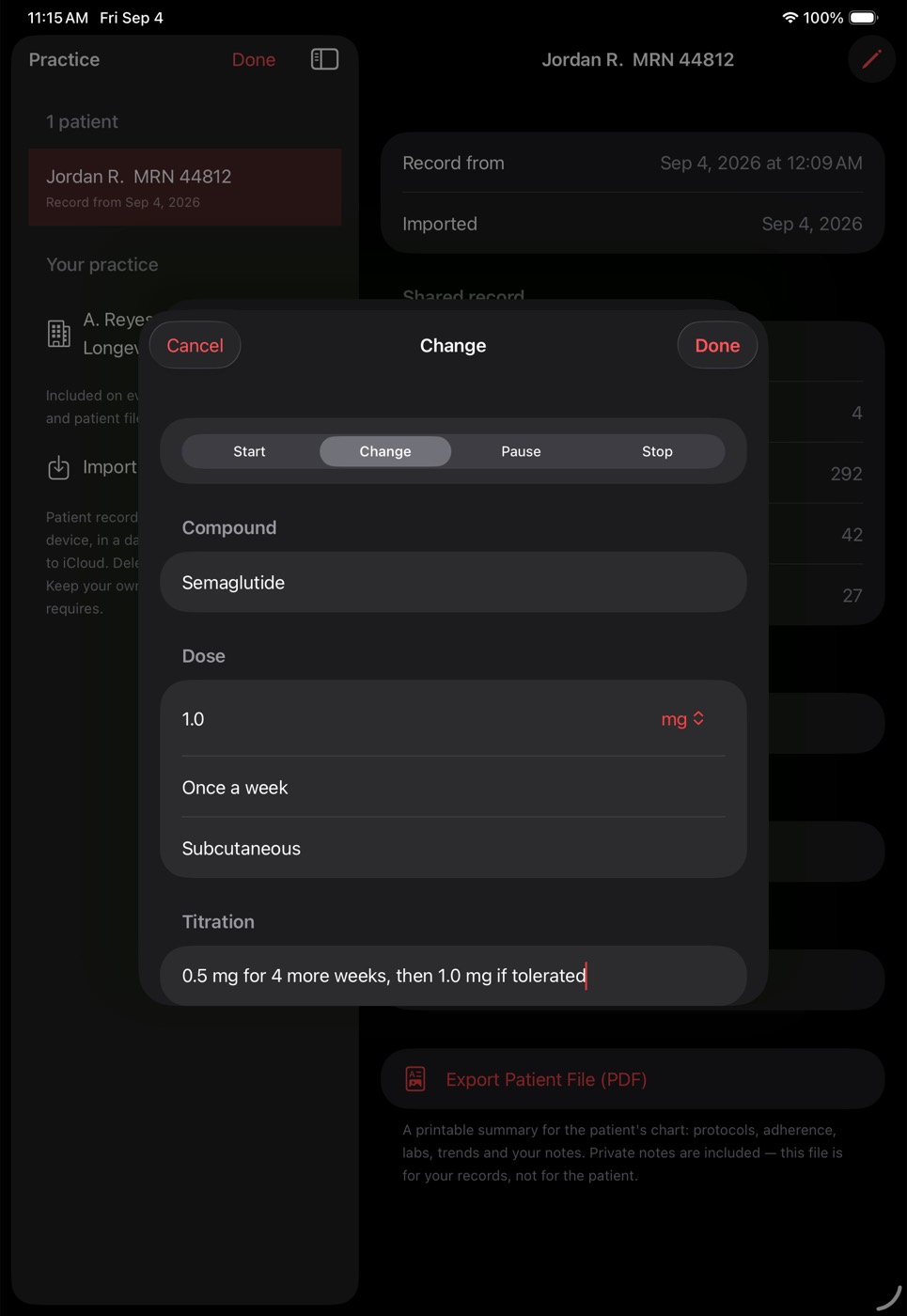
Pick the compound from their own record and the app fills in what they are already on — so changing a dose is one number, not four fields. Add a titration ladder as steps and their app builds it for them.
- Dose, frequency, route, start date and course length
- Titration as real steps, not a note they retype
- The reason you give is what the patient reads
One visit, one file
Everything you decided,
in a single send.
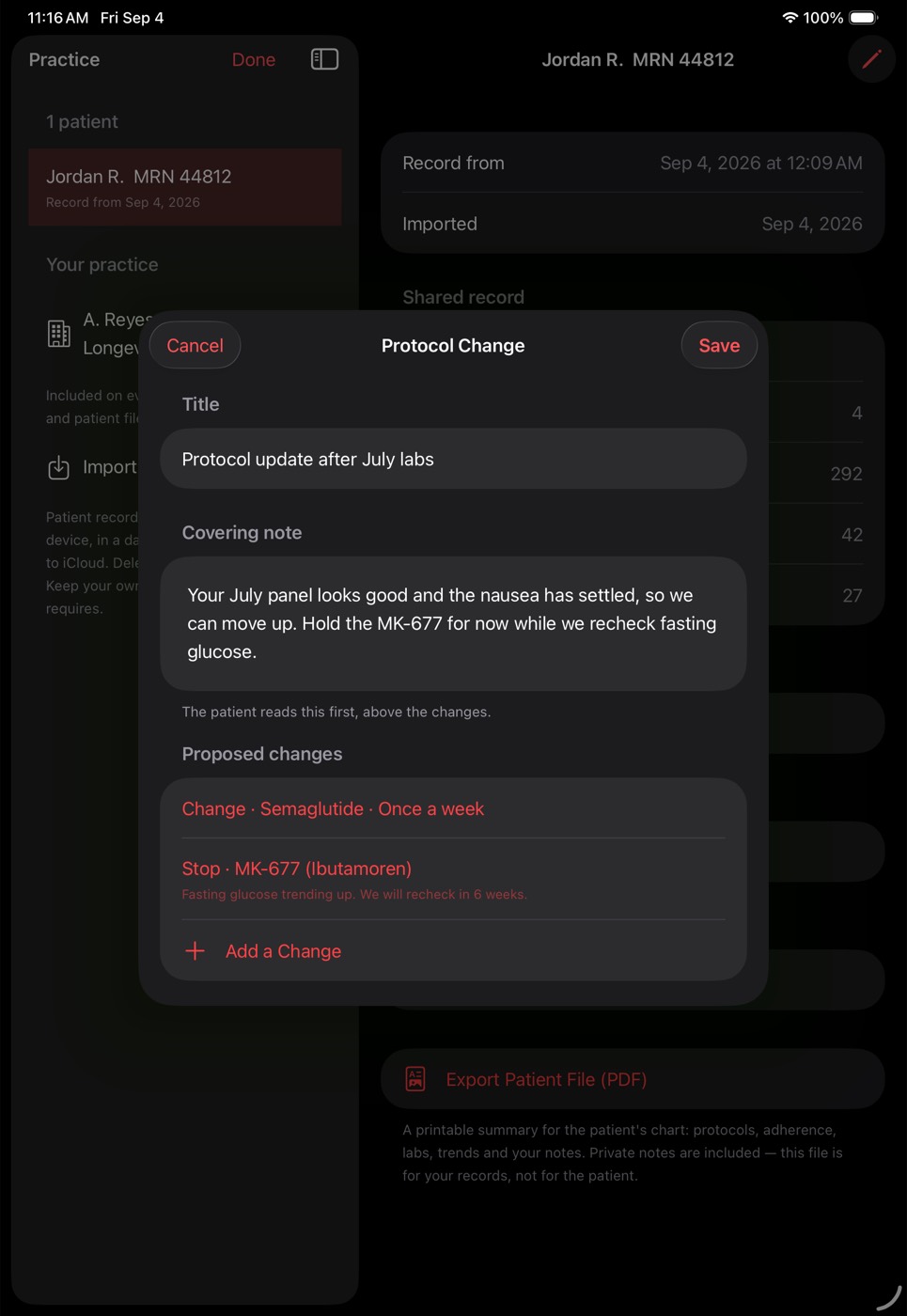
Step the semaglutide up and stop the MK-677 because fasting glucose is drifting — in one file, with a covering note the patient reads first. Stop and pause drop the dose fields, because they do not apply.
- As many changes as the visit needs
- Labs you have and they do not, on the draw date
- Visit notes that land in their own history
Nothing sends itself
Drafts until
you say so.
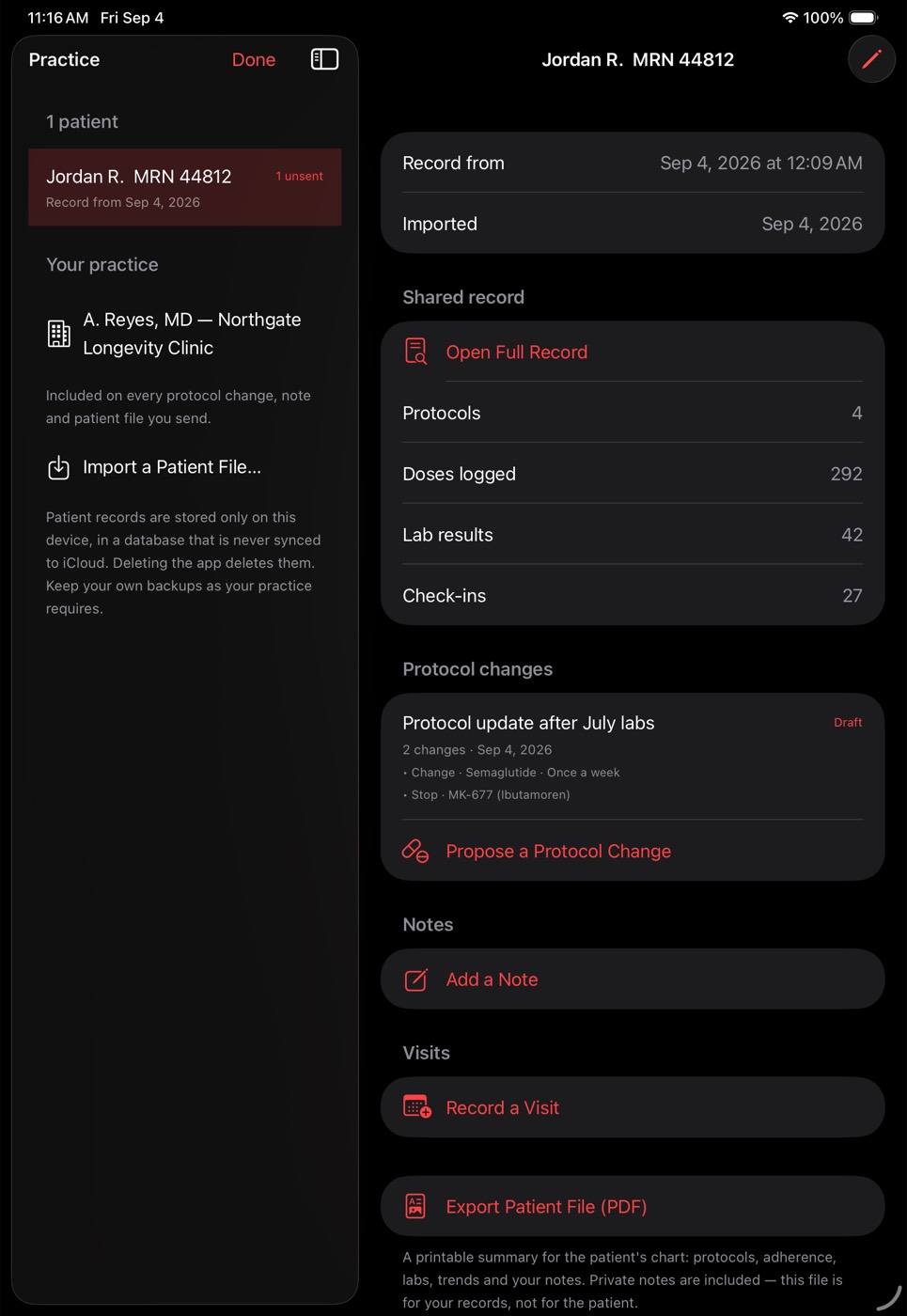
The change sits on the chart marked Draft and the roster shows one unsent, so nothing goes out because you closed a screen. Notes, visits and the printable patient file are on the same chart.
- Private clinical notes stay private, always
- Notes for the patient travel with the next change
- Export a patient file for the chart in one tap
Their side
They tap once.
They type nothing.
Your practice at the top — name, address, phone, NPI — then your covering note, then each change with its reason. Accepting builds the protocol complete with dose, cadence, route, dates and the titration ladder.
- Free for the patient, on every plan
- Nothing is applied without their tap
- They can review and edit first if they want to
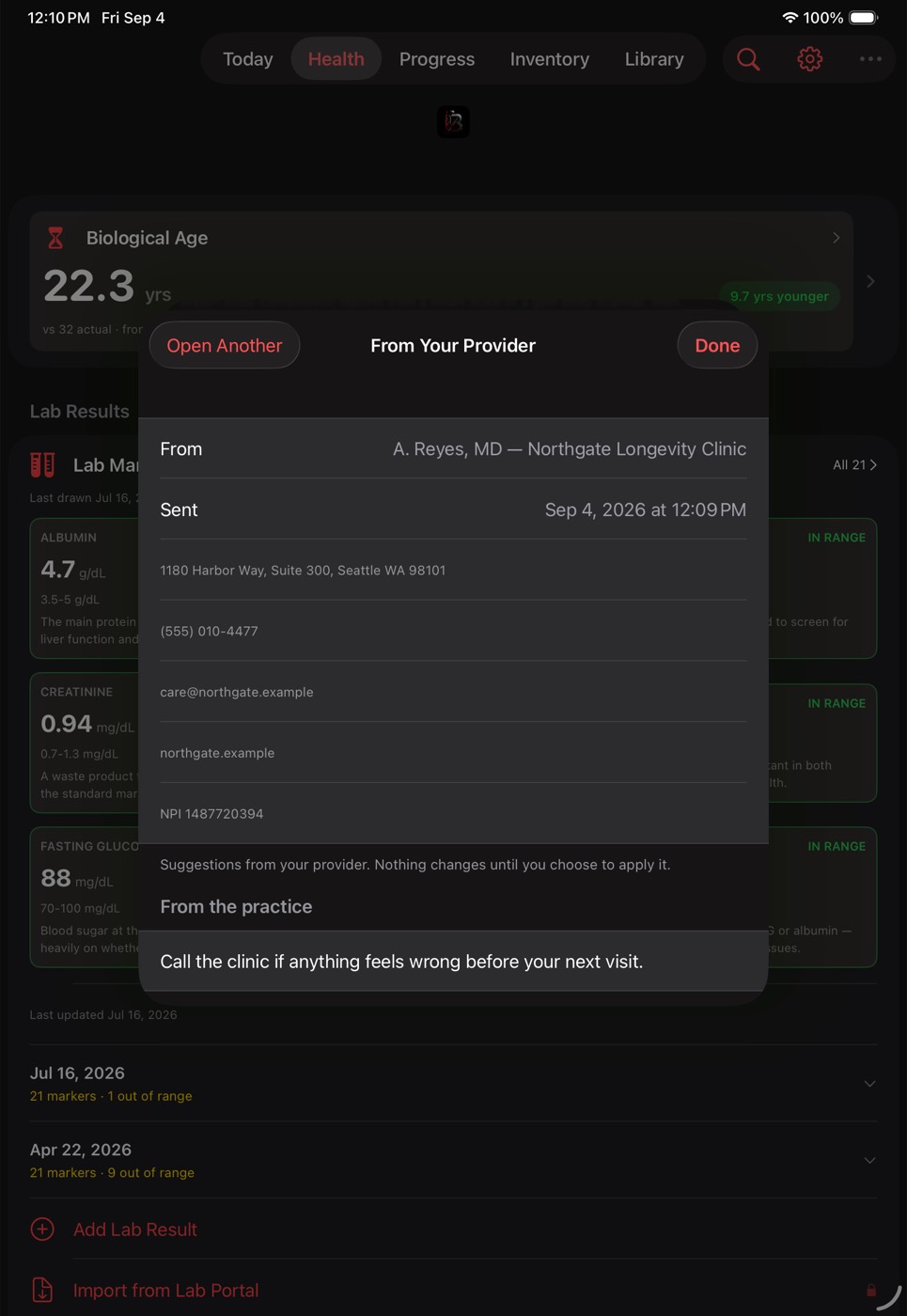
Notes, visits and the chart
Notes come in two kinds and the app keeps them apart: private clinical notes, which never leave your device and are never included in anything the patient receives, and notes for the patient, which travel with the next protocol change you send. Visits are recorded against the specific record you reviewed, so a later comparison has a fixed point to work from.
When you need something for the chart, export a printable patient file — protocols, adherence, labs, dose history, visits and your notes, on US Letter.
Where the data lives
Patient records are held in a database separate from your own tracking data, and it is never synced to iCloud. They are not uploaded anywhere, there is no account, and there is no server of ours holding them. They leave the device only in a file you export — a practice backup, or a patient's chart handed to another clinician — and those files go wherever you send them, never through us. Deleting the app deletes what is on the device, so keep your own backups as your practice requires.
The patient controls what reaches you. When they build the file they choose whether to include dose history, labs, check-ins and photos; anything they leave out never exists in the file.
What this is not
BioHack Track is a record-keeping tool. It does not prescribe, it does not diagnose, and a protocol change sent through it is not a prescription. It carries what you wrote and does the arithmetic. Clinical judgement, and everything your jurisdiction requires around it, stays with you.
The whole thing, end to end
Ten screens.
A patient's record to a protocol change
they can act on.
Nothing below is a mock-up. Every screen is the app, running, with a real record loaded — the same one a patient sends you from the free tier. Read it top to bottom and you have seen the tier.
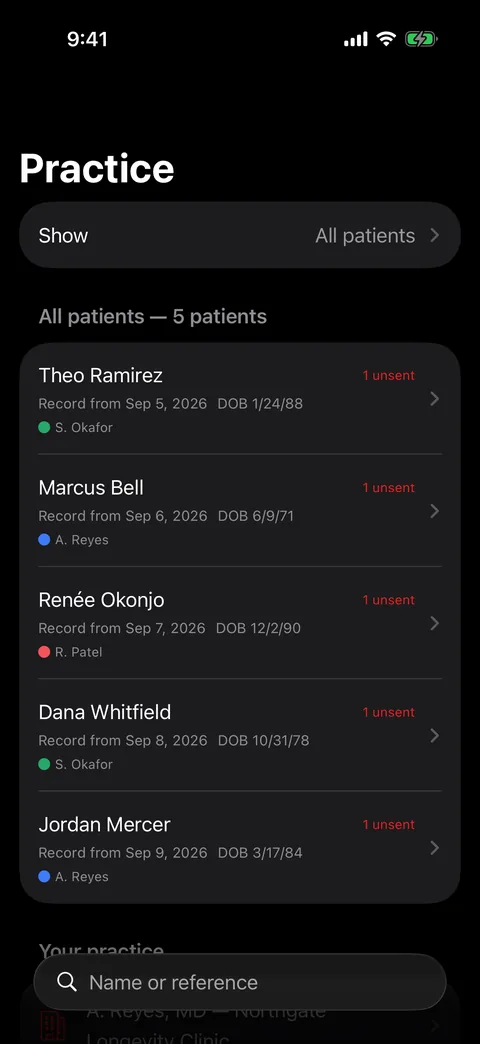
A roster, not an inbox
Every patient you have imported, with the date of the record they last sent, their date of birth, and a coloured dot for the clinician they are seeing. 1 unsent means you have written something they have not received yet — so nothing you wrote can quietly sit there.
No cap on how many people are on it.
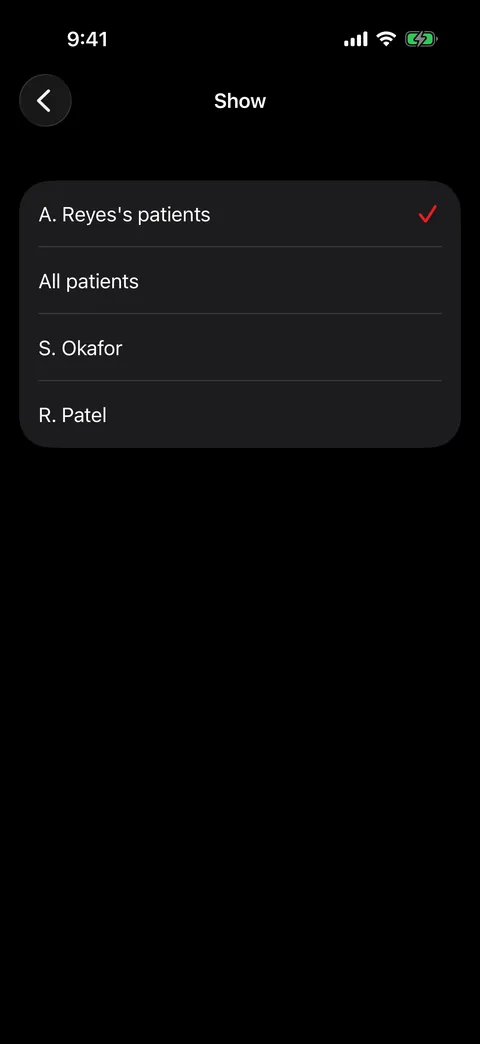
Yours, everyone's, or a colleague's
In a practice with more than one prescriber the roster is filtered to you by default. Switch it to everyone, or to a colleague's list, when you are covering.
A patient nobody is assigned to still appears in your own list, rather than disappearing into a group nobody opens.
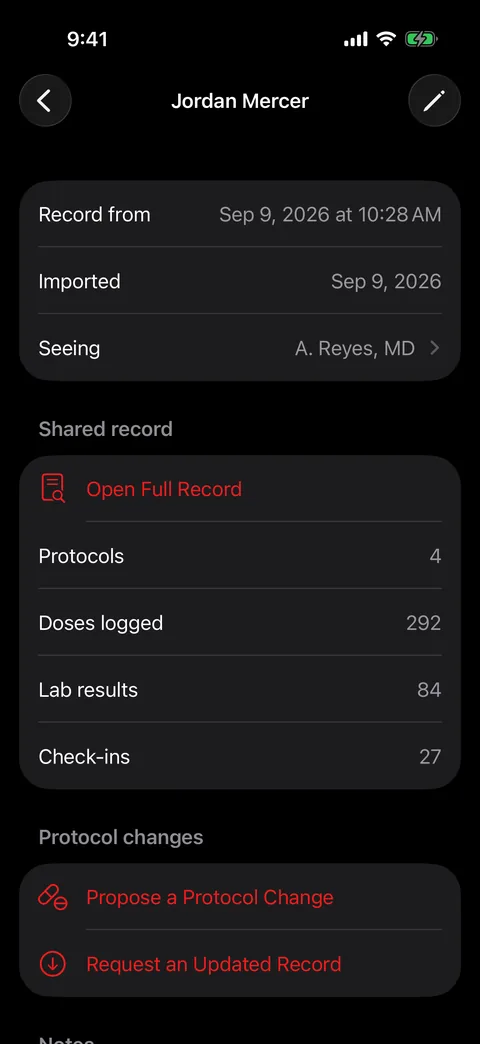
What they actually sent
Four protocols. 292 logged doses. 84 lab results. 27 check-ins. That is one patient's twelve weeks, and none of it was retyped by you or by them — it is the record their own app has been building since they started.
Read-only. Importing a record never changes what the patient holds.
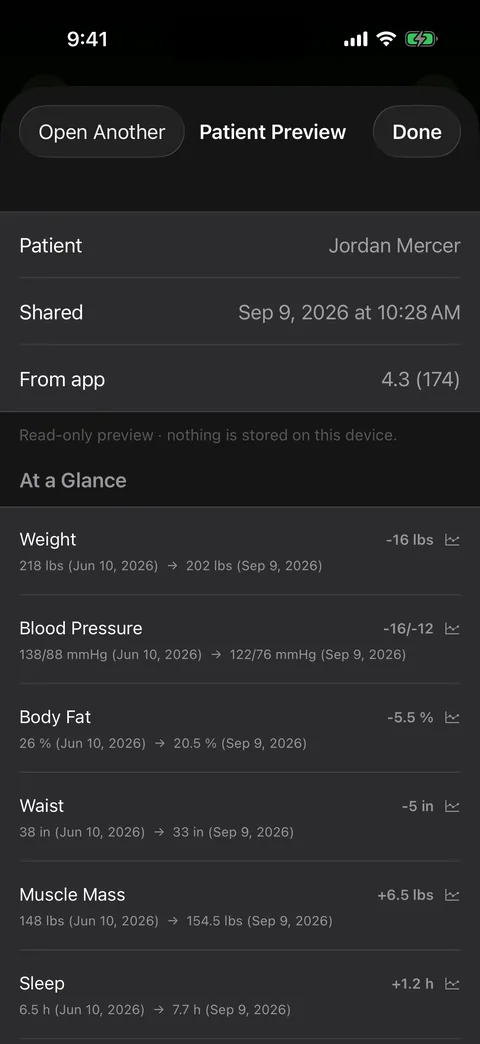
The answer before the detail
Every metric as where they started → where they are now. Weight −16 lbs. Blood pressure −16/−12. Body fat −5.5%. Waist −5 in. Muscle mass +6.5 lbs. That is the consultation's first question answered before you have scrolled.
Each row opens into its own chart.
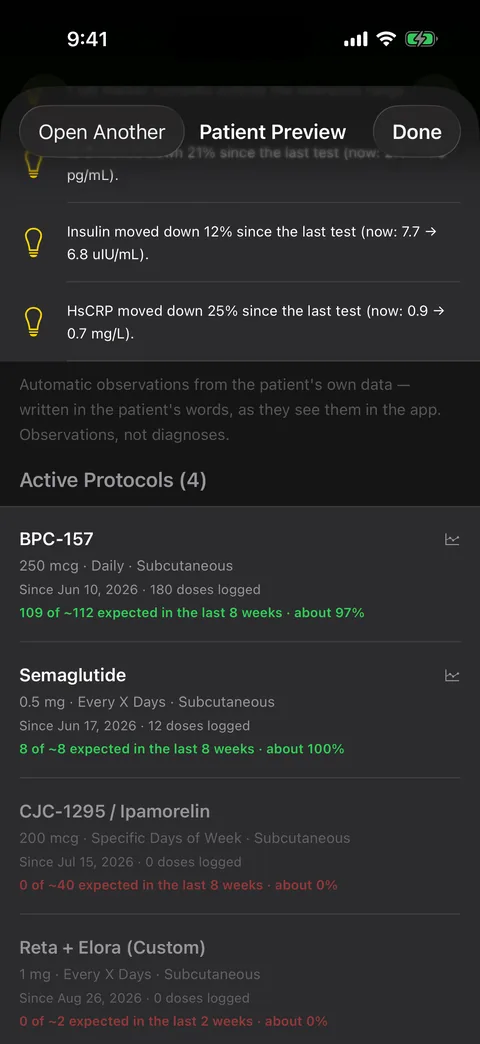
Did they actually take it?
Adherence per protocol, as doses taken against doses expected — because “it is not working” and “they took nine of forty” are different conversations, and the chart cannot tell them apart on its own.
Deliberately approximate, and it says so: the record carries no note of days they paused.
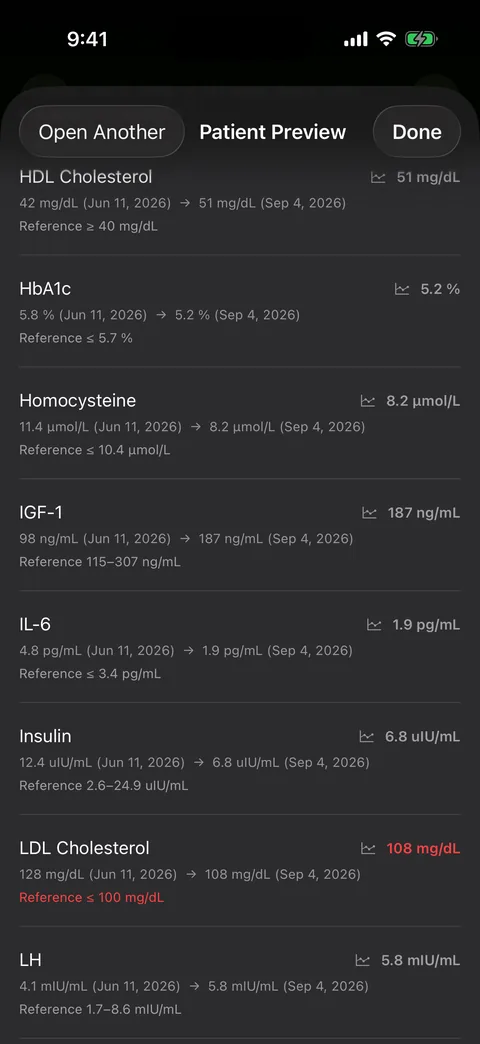
Labs with the range beside them
First reading, latest reading, and the reference range on every marker — with anything outside it in red. HbA1c 5.8 → 5.2. Homocysteine 11.4 → 8.2. LDL still above range and flagged.
Imported from their portal PDF on their side, not transcribed on yours.
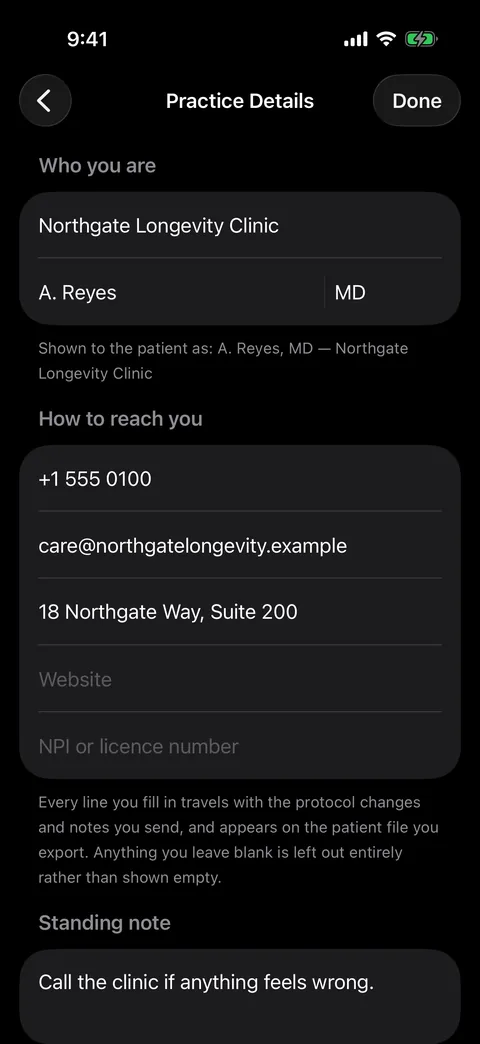
Your letterhead, entered once
Practice, clinician, credentials and how to reach you. It travels inside every protocol change you send and prints on every patient file you export.
Anything you leave blank is left out entirely, not shown empty.
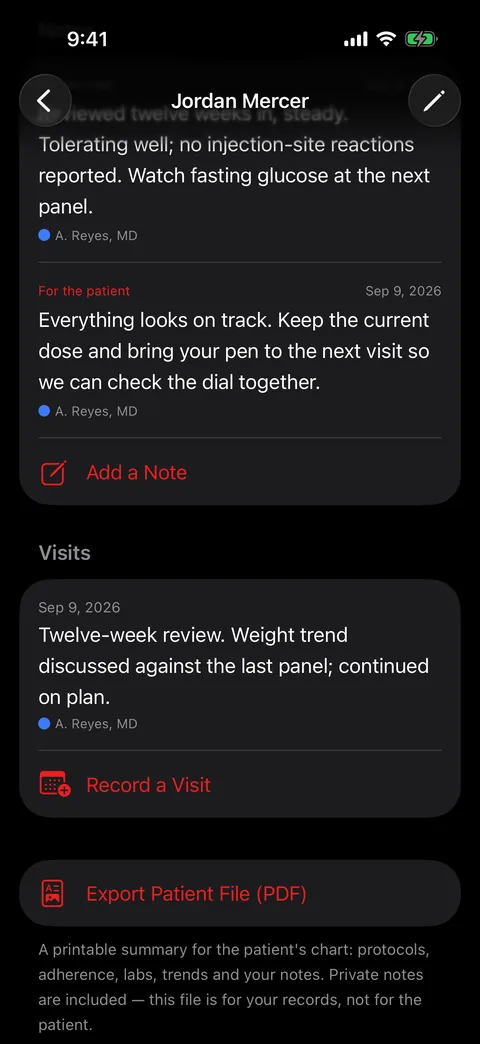
Two kinds of note, and who wrote them
A private clinical note the patient never receives, and a note for the patient that goes out with your next change. Both stamped with the clinician who wrote them, and that stamp never changes afterwards.
A private note does travel inside a chart you hand to a colleague — that is who it was written for.
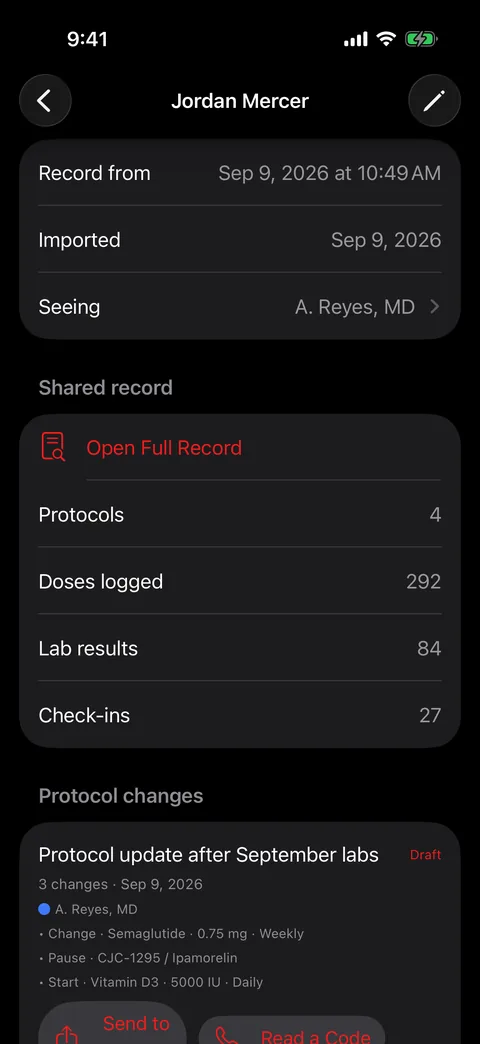
Write back in their own vocabulary
Start, change, pause or stop — picked against the compounds they are already on. This draft steps semaglutide up with a titration ladder, pauses one peptide pending a lab, and starts another. It stays a draft until you send it.
It is not a prescription, and the app does not prescribe. Your patient reviews every line and chooses.
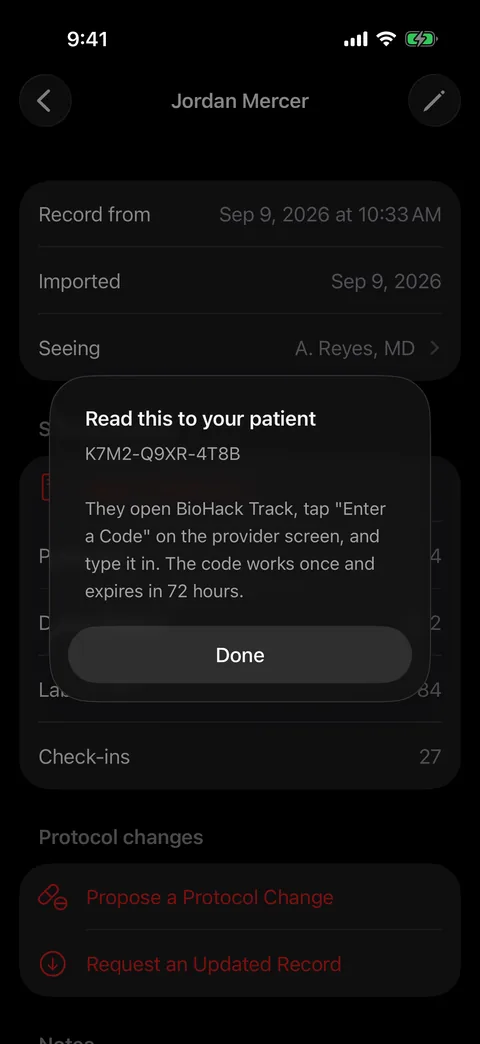
Or just read it down the phone
No portal, no email, no attachment. Twelve characters you read aloud. They open the app, tap Enter a Code, and your change is in front of them. It is encrypted on your device before it leaves, works once, and expires in 72 hours.
The relay never receives the code, so it can never open what it is holding.
Nothing is applied automatically. A start or a change opens the patient's own protocol editor so they see the exact record before it saves; a pause or a stop asks them to confirm. Reading what you send is free on every tier — there is nothing for them to buy.
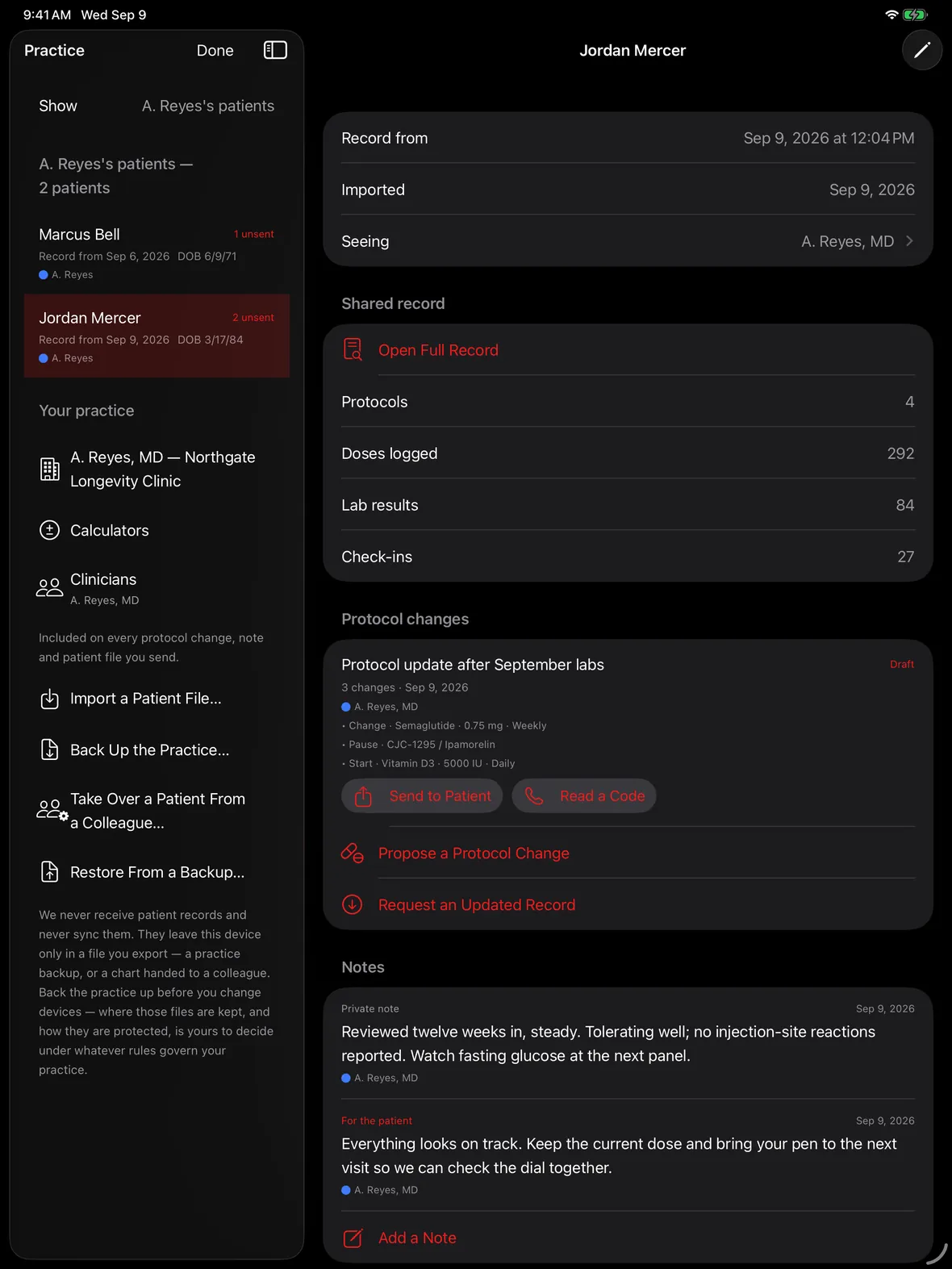
On iPad
The whole case, side by side.
On iPad the roster sits beside the record, so the patient list, what they sent, the change you are drafting and every note you have written are on one screen — no switching, no losing your place mid-consultation.
When a case moves
Cover, refer, or hand it over.
Hand a patient to a colleague
A single patient exports as one file — the whole chart, not a summary: every past record, your notes, visits and protocol changes, and who wrote each of them. The receiving clinician opens it in BioHack Track and carries on.
They see what will happen first
The import names the patient and says whether they are already on the roster before anything is written. Importing the same person again updates their record instead of filing them twice, and patients are matched by identity rather than by name.
Only the clinicians who touched them
A handover carries the people that patient's own records name, and no one else. Handing over one chart does not hand over your roster.
Names stay on the work
Add every physician, NP and PA in the practice and set who is using this device. Notes, visits and changes then carry that name, stamped when written and never rewritten. Someone who leaves is marked as gone, not deleted — their notes are part of the record.
Back the practice up
One file holds the roster, every patient, every note and visit. It is how you move to a new device, and the only copy that exists is the one you made — we have no server holding it.
A file that will not open, opened
A backup written by an older version could be refused whole because one clinician had no credentials saved. Current versions read those files and repair them: import it, export a fresh one, and it opens anywhere.
Pricing
19.99 a month.
Your patients pay nothing.
One subscription covers your whole practice — there is no per-patient fee and no cap on how many people are on the roster. The people sending you records use the free tier, and reading what you send back is free on every tier, so there is nothing for them to buy and nothing to explain.
Cancel any time. Includes everything in Pro.
Two months free against monthly billing.
Nothing to integrate
No portal, no EHR project, no IT ticket, no credentials to issue. A patient sends a file or you read a twelve-character code down the phone.
Nothing to retype
Twelve weeks of doses, labs, weights and check-ins arrive as a chart you can read, not as a printout to key in. The patient did the entry, on their own phone, for free.
Nothing held hostage
Patient records never sync to iCloud and never reach us. Everything leaves in files you export yourself, so there is nothing to extract if you stop paying and no server that could hold it.
Provider is $19.99/month or $199.99/year, and includes everything in Pro. Your patients use the free tier to build the record and to read what you send back — there is nothing for them to buy.
Keep reading
Questions
How much is the Provider tier?
$19.99 a month or $199.99 a year. Provider includes everything in Pro, so a clinician who also tracks their own protocol does not need two subscriptions.
How many patients can I have?
There is no cap. The roster is searchable by name or by your own chart or MRN reference, and patients you are no longer seeing can be archived without deleting anything.
How does a patient send me their record?
In their app: Settings, then Share With Your Provider. They choose what to include, and get a single file they can send you however they like — AirDrop, Messages, email or Files. It is a snapshot of that moment; it does not give anyone live access to their app.
Where are patient records stored?
In a database on your device, separate from your own data and never synced to iCloud. Nothing is uploaded to us, and there is no account. You can export them — a practice backup, or one patient's chart to hand to a colleague — and those files go wherever you send them. Deleting the app deletes what is on the device, so keep your own backups as your practice requires.
Can I change a patient's protocol directly?
No, and that is deliberate. You propose a change — start, change, pause or stop — and your patient reviews each item in their own app and chooses what to apply. Nothing is applied automatically. A file that silently rewrote someone's dosing would make this a tool that administers treatment rather than one that records it.
Does the patient need to pay to receive what I send?
No. Opening a protocol change from a provider is free on every plan, including the free tier. Reading what your clinician sent you is not a premium feature.
Will my private notes ever reach the patient?
No. A note is either private or marked for the patient, and only the latter travels with a protocol change. It is enforced in one place in the code and covered by an automated test that checks the private text is absent from the bytes of the exported file.
Is this a HIPAA-compliant system?
BioHack Track is a record-keeping app, not a covered-entity platform, and we do not offer a Business Associate Agreement. We never receive, store or transmit patient records — they stay in your control, on your device and in any file you choose to export — which means those records and their protection are yours to manage under whatever obligations apply to your practice. Evaluate it against your own compliance requirements before using it with patients.
Does it prescribe or give clinical advice?
No. It passes on what you wrote and does the arithmetic. It does not prescribe, it does not diagnose, and a change sent through it is not a prescription.
For personal tracking. Not medical advice, and not a substitute for your prescriber.